Product details / A connected project management framework

One framework for project work.
From planning to management reporting.

Project Control structures the project; document modules manage engineering deliverables and correspondence. Rules and weighted rollups turn execution data into progress for dashboards, lookahead and reporting. Explore the modules along that workflow.

01 / Project planning & scheduling

Design, procurement and manufacturing in one WBS.

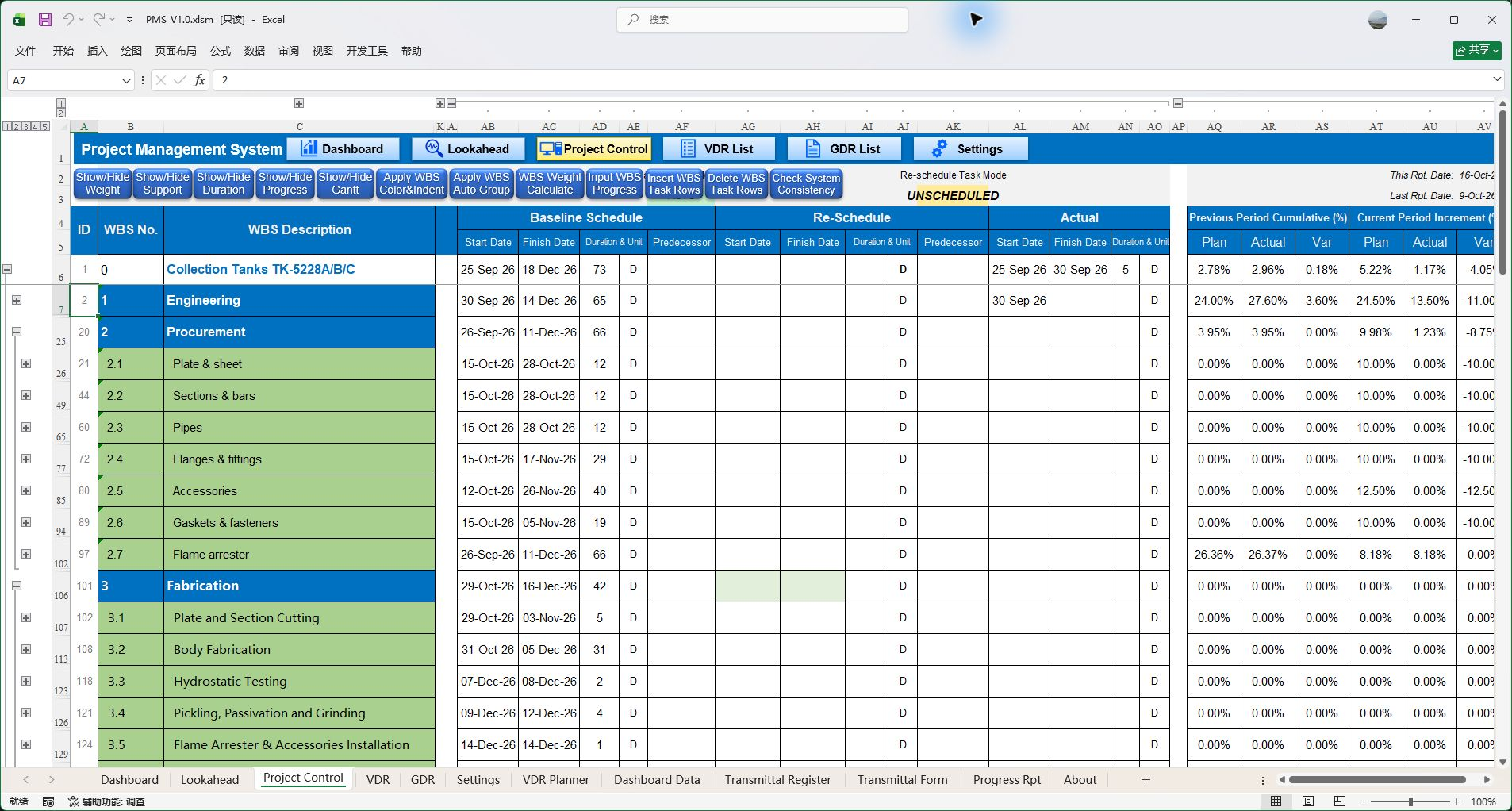
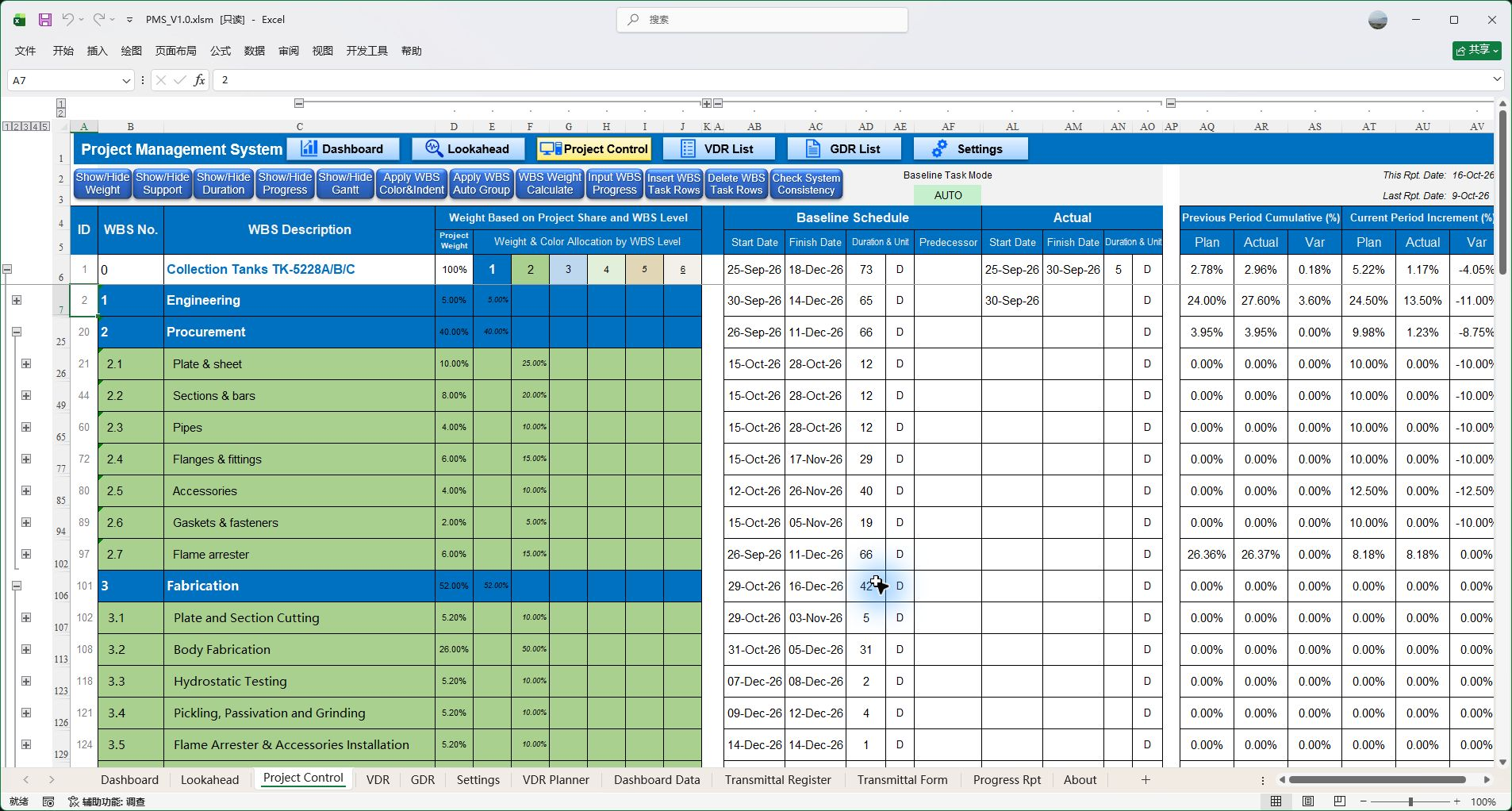
Project Control provides the structure for the overall schedule and progress. Define WBS levels, Task IDs and task weights, then link stages through predecessor relationships for ordinary and document-related tasks.

  • FS, SS, FF and SF relationships, multiple predecessors and positive or negative lag.
  • Manual and automatic scheduling with calendars, D working days and ED elapsed days.
  • Hierarchy rollups and static day-based Gantt charts, including zero-duration milestones on ordinary leaf tasks.
A project plan with structure, dependencies and a consistent basis for rollups.
Read the operating instructions
PMS V1.0 · Project Control: task hierarchy and project planning.
Enlarge · View full screenshot
PMS V1.0 · Project Control: task hierarchy and project planning.
02 / Baseline & Re-schedule

Keep the baseline and give revisions their own place.

Baseline and Re-schedule each maintain dates, duration, duration units and predecessor relationships. Actual execution data is managed independently for comparison against the selected schedule basis.

  • Display and edit each schedule with its own scheduling data.
  • Switching the display, changing a plan and publishing document plans are separate operations.
  • Select a reporting Basis so comparisons, curves and commentary use the same reference.
Distinguish the original plan, revised arrangements and actual execution as plans change.
Read the operating instructions
PMS V1.0 · Separate Baseline, Re-schedule and Actual fields. Re-schedule is not populated in this example; original blank values are retained.
Enlarge · View full screenshot
PMS V1.0 · Separate Baseline, Re-schedule and Actual fields. Re-schedule is not populated in this example; original blank values are retained.
03 / VDR Planner

Connect engineering milestones to downstream work.

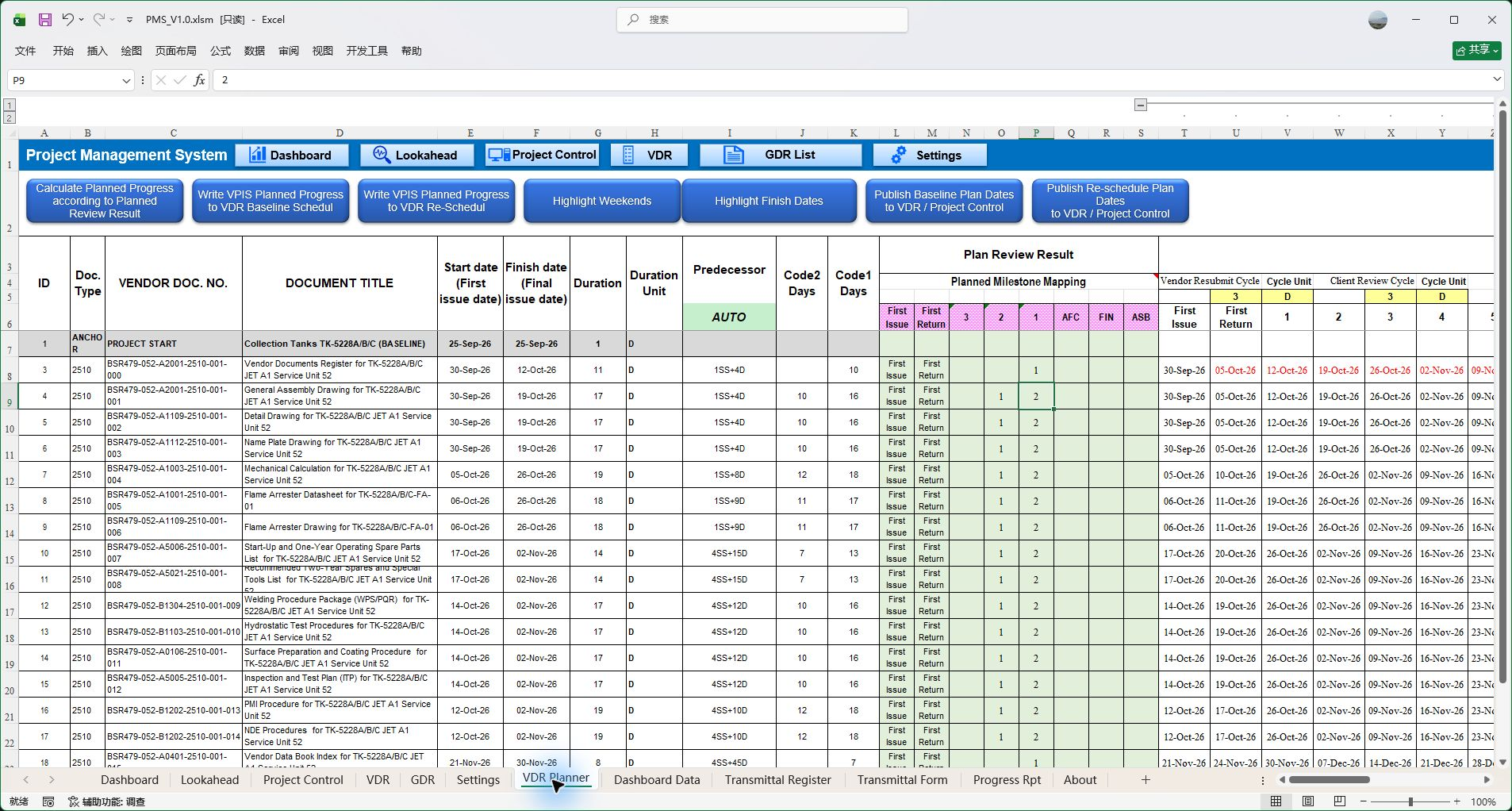
VDR Planner schedules first issues, review and resubmission cycles, target Codes by round and planned progress. Document milestones can inform the scheduling of downstream procurement and manufacturing tasks.

  • Use Vendor / Client calendars and document dependencies to organize dates.
  • Plan review rounds, target Codes and progress at each milestone.
  • Publish one way to VDR and Project Control under the selected Baseline or Re-schedule; republish changes through the workflow.
Engineering document plans become part of the wider project plan, reflecting review impacts on subsequent work.
Read the operating instructions
PMS V1.0 · VDR Planner: engineering issue and review plans.
Enlarge · View full screenshot
PMS V1.0 · VDR Planner: engineering issue and review plans.
04 / VDR · GDR · Transmittal

Clear records for engineering deliverables and correspondence.

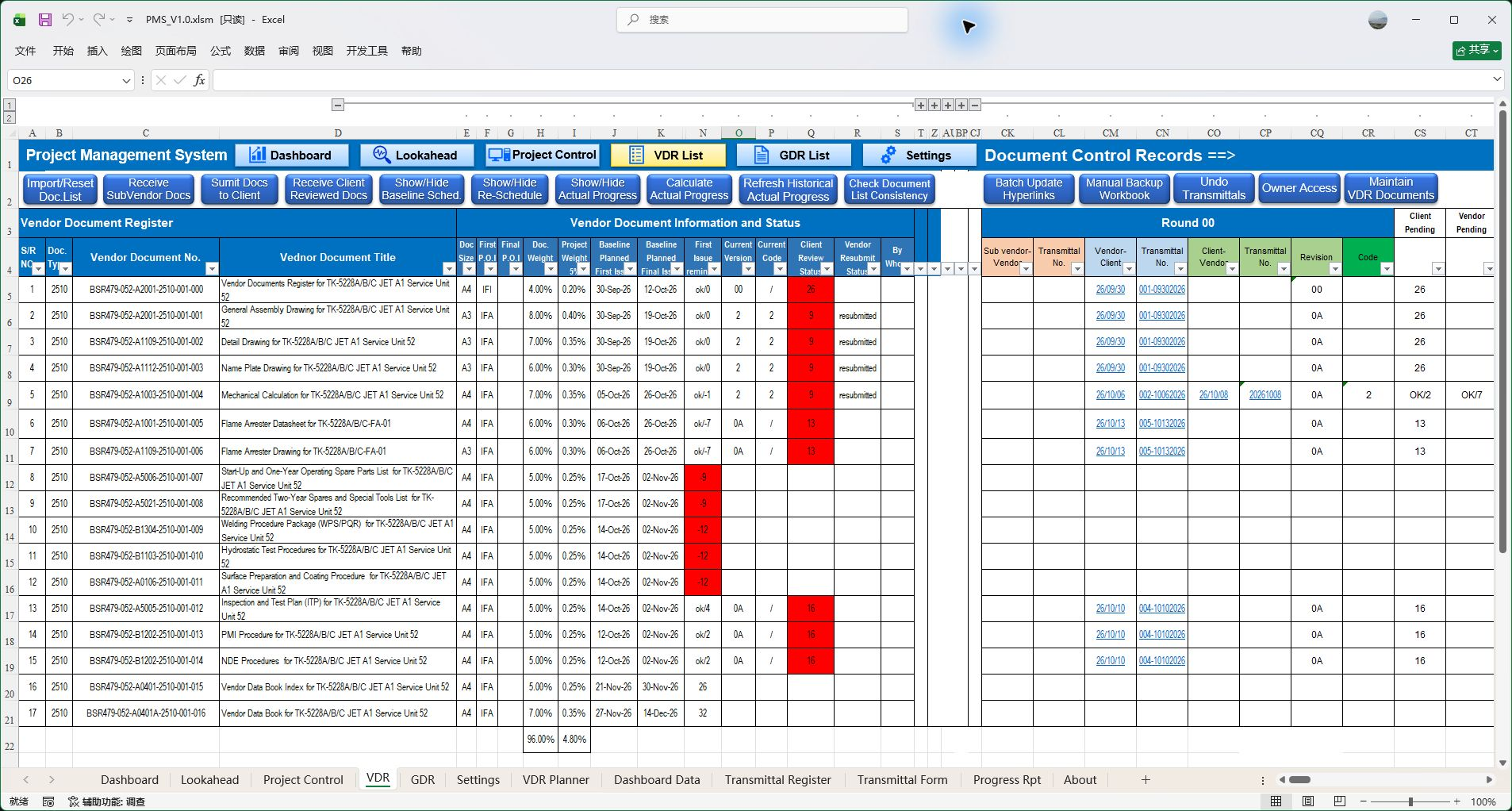
VDR manages issues, client replies, sub-vendor documents, revisions and review Codes against a predefined engineering document list. GDR handles event-based TQ, CRS, NCR, MOM, replies and attachments without a predefined engineering list.

  • Recognize Doc No. and Revision under configurable rules; archive and update registers and links.
  • Generate custom transmittals and PDFs with related register entries.
  • Use the corresponding business undo workflows to handle corrections as instructed.
File processing, correspondence registers and delivery records connect, reducing repeated preparation.
Read the operating instructions
PMS V1.0 · VDR: engineering documents and correspondence.
Enlarge · View full screenshot
PMS V1.0 · VDR: engineering documents and correspondence.
05 / Actual progress & history

Task and document progress feed the same project control.

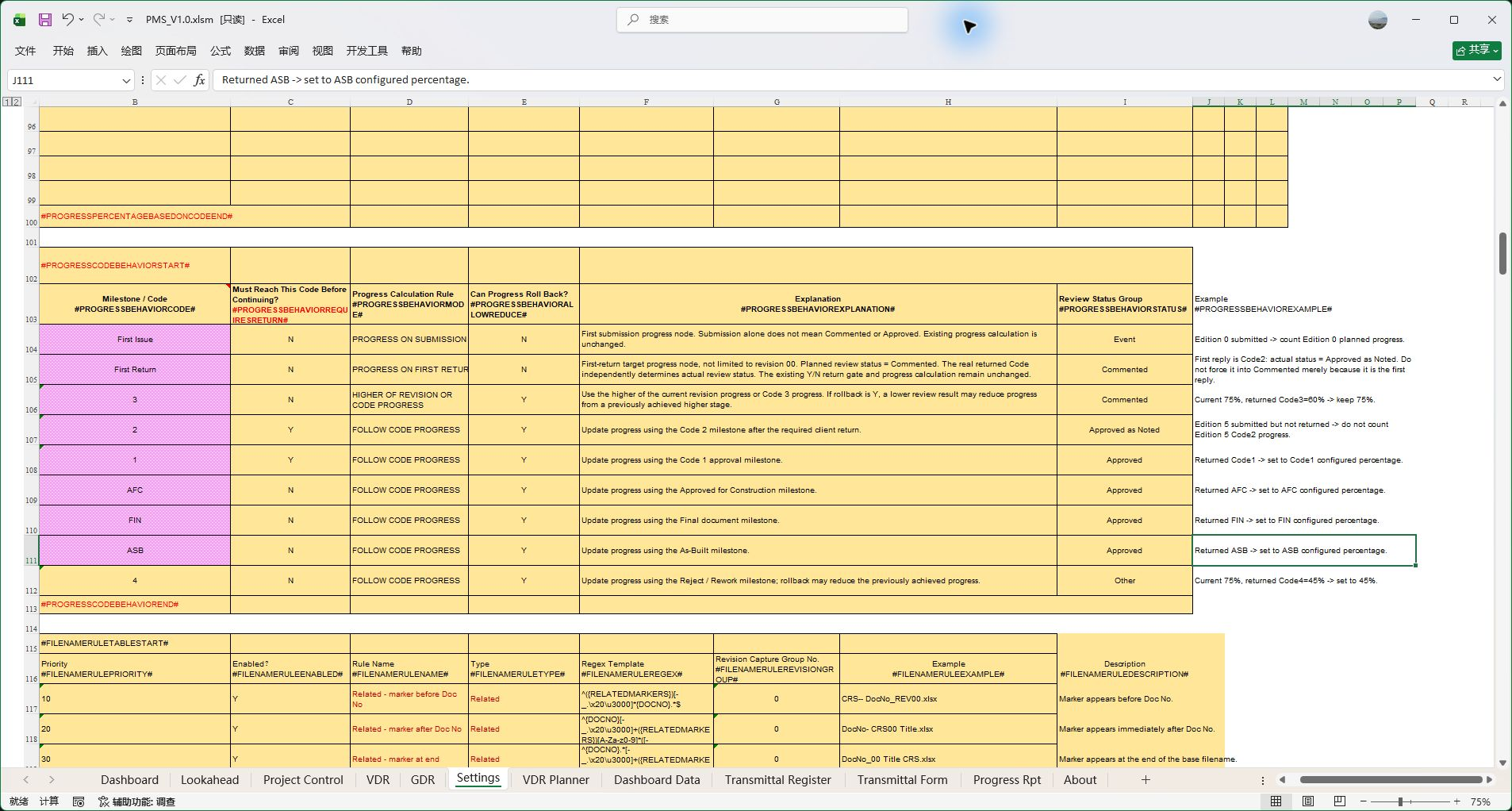
Ordinary procurement and manufacturing tasks have maintained actual dates and progress. Engineering documents earn progress under document type, First Issue, First Return and review Code rules. Both roll up through WBS weights into project actual progress.

  • Configure document credit and behavior; choose by type whether intermediate credit follows Planner rounds.
  • Record Actual Progress stores actuals for the current reporting period.
  • Refresh Actual Progress reconstructs historical data from document history and rules for late entries and corrections.
See current completion and maintain historical progress with a traceable basis.
Read the operating instructions
PMS V1.0 · Configurable project document progress rules.
Enlarge · View full screenshot
PMS V1.0 · Configurable project document progress rules.
06 / Dashboard & Lookahead

See the whole project. Focus the next action.

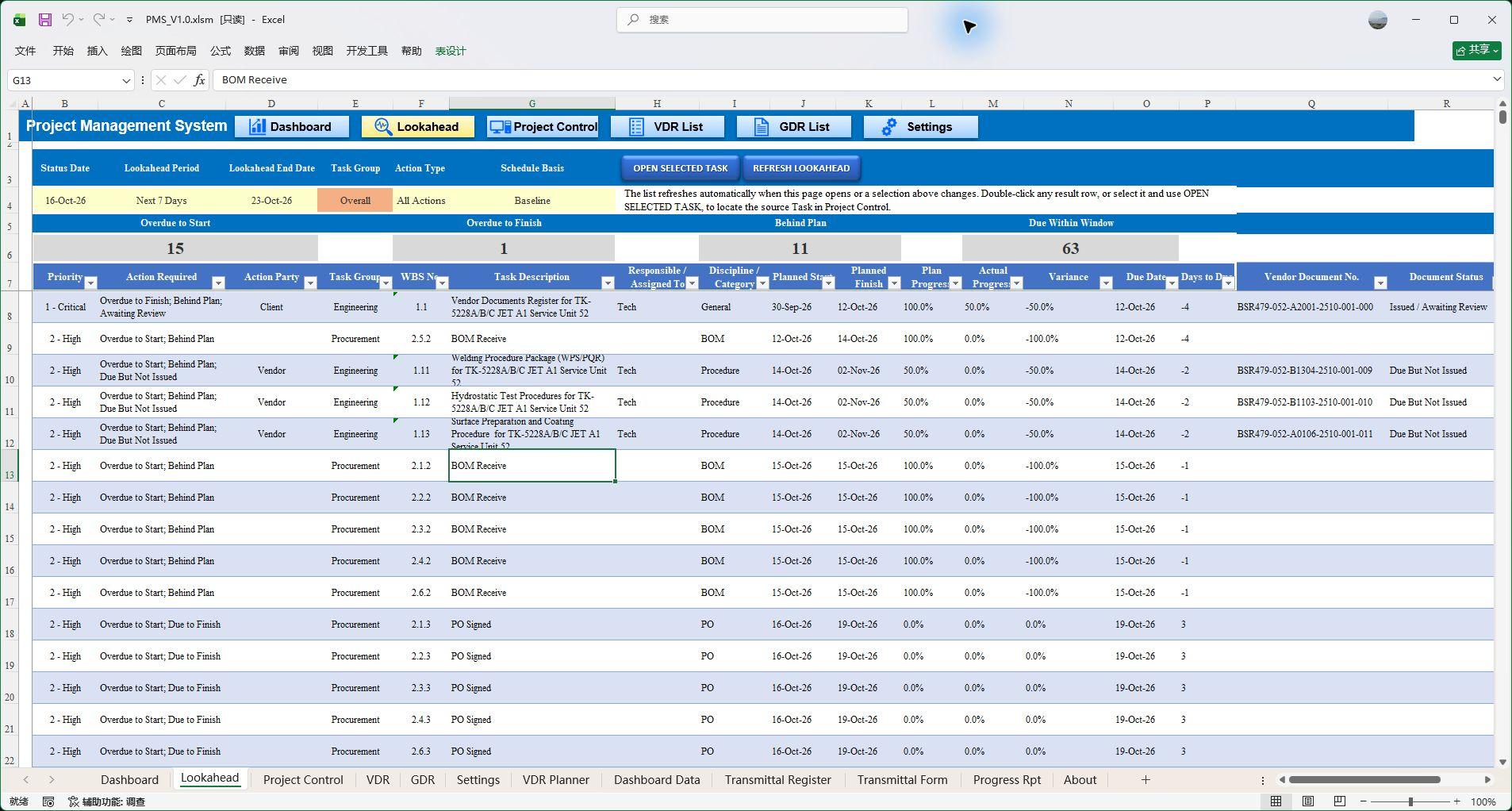
Dashboard presents overall, discipline and category status and variances. Lookahead focuses a time window on upcoming, overdue and delayed work, connecting summaries to items that need coordination.

  • Query by reference date, task scope, item type and schedule basis.
  • Identify late starts, overdue work, pending submissions and outstanding replies.
  • Navigate to Project Control or VDR source records to verify and follow up.
Move from “How is the project doing?” to “What needs to move next?”
Read the operating instructions
PMS V1.0 · Lookahead: time windows and upcoming work.
Enlarge · View full screenshot
PMS V1.0 · Lookahead: time windows and upcoming work.
07 / Curves & periodic reports

Carry everyday project data into each management report.

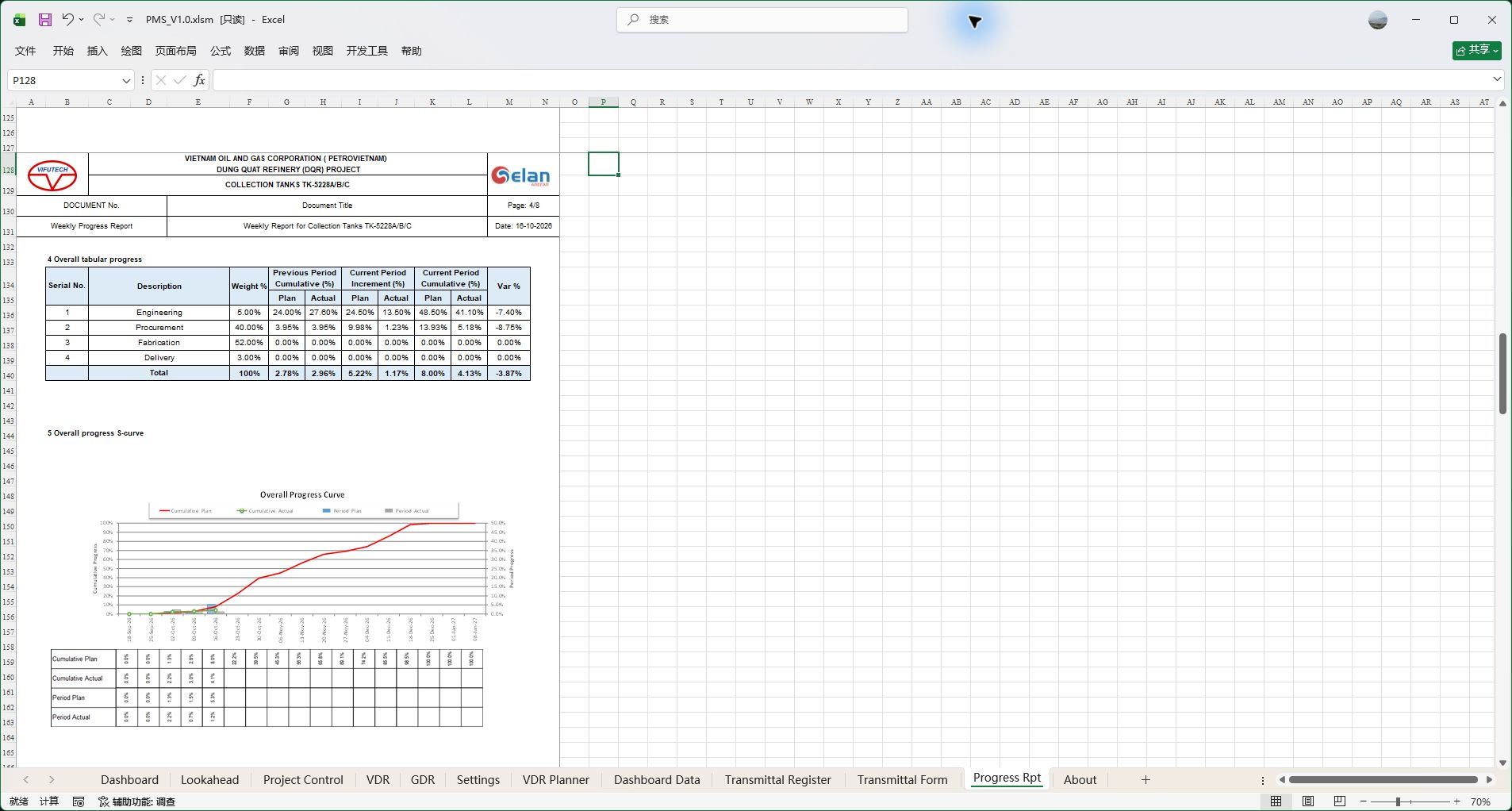
Organize Baseline, Re-schedule and Actual curves, period progress and management reports. Configure daily, weekly, biweekly, month-end or fixed-monthly reporting dates for the project.

  • Organize curve data by WBS, time range and schedule basis.
  • Record actuals and refresh curves and report content through the workflow.
  • Combine data, curves and management commentary, then export the report to PDF through Excel.
Reduce repeated report assembly and maintain clear links between plans, actuals and the reporting basis.
Read the operating instructions
PMS V1.0 · Project data carried into progress curves and reporting.
Enlarge · View full screenshot
PMS V1.0 · Project data carried into progress curves and reporting.
PMS V1.0 / PROJECT WORK IN PRACTICE

Projects change. Keep the work connected.

MILESTONES

Put key events into the project plan.

Use numeric zero duration on ordinary leaf tasks for events such as project start, order effectiveness or delivery confirmation, connected to predecessors, both schedules and the Gantt chart.

  • Maintain dates and relationships separately in Baseline and Re-schedule; Gantt diamonds identify milestones.
  • Planned due dates and actual achievement remain separate, with weights set under project measurement rules.
VDR MAINTENANCE

Change the current list. Keep the history.

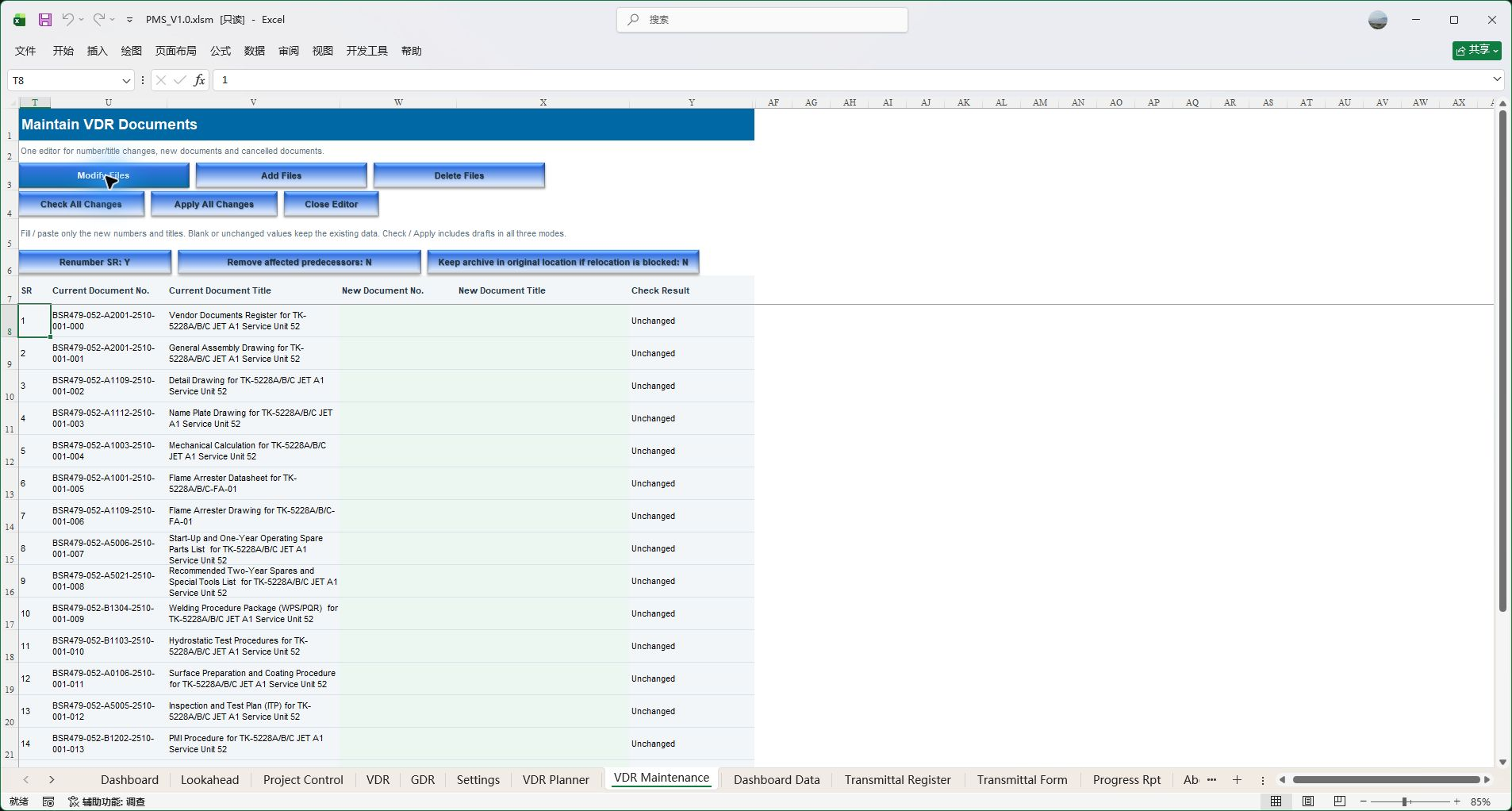
During execution, modify document numbers or titles, add documents and cancel documents in one maintenance workflow. Check the complete batch before confirming changes.

  • Changes link VDR, Planner, PC and registers; recorded former numbers can help identify incoming documents using old numbers.
  • Past correspondence and issued transmittals remain part of the record. Review plans, weights and current progress after maintenance.
REVIEW STATUS & ACTION

See approval status and progress as distinct information.

Compare planned and actual document issue and approval categories on the Dashboard. Configure Code status groups by project meaning, independently of progress-credit rules.

  • Approval status and completion percentages answer different management questions.
  • Pending issues, resubmissions and replies help focus follow-up and coordination.
PMS V1.0 · VDR Maintenance: modify, add and cancel through one editor. Shown before entering any changes.
Enlarge · View full screenshot
PMS V1.0 · VDR Maintenance: modify, add and cancel through one editor. Shown before entering any changes.
SETTINGS / PROJECT RULES

Bring project-specific rules into everyday work.

Configure WBS, task weights, Vendor / Client calendars, document types, review Codes, progress credit, file recognition, transmittals and reporting periods. Keep familiar Excel operations while VBA handles repetitive processing, with users completing the required setup, checks and refresh steps.

Read the operating instructions
CHECK SYSTEM CONSISTENCY

Review consistency after plans and settings change.

Check key settings, Task IDs, dependencies, document lists, published data and relevant formulas. A separate check report helps locate issues and identify corrections.

Read about consistency checks
EXCEL PMS / VIEWER

Open a project. See whether PMS fits your work.

Download the unregistered workbook to explore project data, dashboards and supported viewing functions in Viewer. Full functionality requires a valid device license.